


228 Messages
•
5.7K Points
Lists idea: Coloured dots on title/search pages, per list.
Can we please(!) once and for all have some visual cue on pages as to when a title appears on one or several of our (personal) lists?
Without writing out a massive explanation here, I just knocked up a super-quick mockup of screen-shots to illustrate the idea as they'd appear on each different page. Obviously this is very crude, but it gives one an idea of how these could be accomplished.
Notice the three coloured dots on each IMDB page...
The idea is that these are chosen by the user for each list they have, with enough screen realty to display say up to 10 distinctively different coloured dots on each screen, and the user only being able to use one colour of dot per list, to avoid having the same colour used for multiple lists (making them pointless, obviously).
These dots should be available to all users, regardless of them using the standard view or the reference view.
So you could have your "Watchlist" or "Want To See" list in RED dot, "Seen" in BLUE dot, "Favourites" in WHITE dot. Or whatever your heart desires, as a user!
Thus for the example below, I'd know this title appeared in my:
RED dot = "Want To See" [presumably again!]
BLUE dot = "Seen"
WHITE dot = "Favourites"
They would appear on each page view, as follows...
- Search results (desktop browser):

- REFERENCE view title page (desktop browser):

- STANDARD view title page (desktop browser):
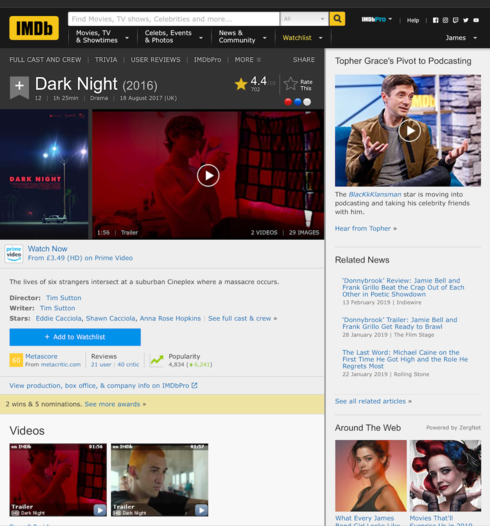
- Search results (iOS app):

- Title page (iOS app):

You'd obviously have some other views I haven't bothered to do for this mockup, and you'd likely want to do something similar for actors lists (maybe use coloured squares, instead or something).
Anyway, thoughts?
Without writing out a massive explanation here, I just knocked up a super-quick mockup of screen-shots to illustrate the idea as they'd appear on each different page. Obviously this is very crude, but it gives one an idea of how these could be accomplished.
Notice the three coloured dots
The idea is that these are chosen by the user for each list they have, with enough screen realty to display say up to 10 distinctively different coloured dots on each screen, and the user only being able to use one colour of dot per list, to avoid having the same colour used for multiple lists (making them pointless, obviously).
These dots should be available to all users, regardless of them using the standard view or the reference view.
So you could have your "Watchlist" or "Want To See" list in RED dot, "Seen" in BLUE dot, "Favourites" in WHITE dot. Or whatever your heart desires, as a user!
Thus for the example below, I'd know this title appeared in my:
RED dot = "Want To See" [presumably again!]
BLUE dot = "Seen"
WHITE dot = "Favourites"
They would appear on each page view, as follows...
- Search results (desktop browser):
- REFERENCE view title page (desktop browser):
- STANDARD view title page (desktop browser):
- Search results (iOS app):
- Title page (iOS app):
You'd obviously have some other views I haven't bothered to do for this mockup, and you'd likely want to do something similar for actors lists (maybe use coloured squares, instead or something).
Anyway, thoughts?
jimthing
228 Messages
•
5.7K Points
8 years ago
0
jimthing
228 Messages
•
5.7K Points
8 years ago
0
ljdoncel
Champion
•
1.5K Messages
•
57.3K Points
8 years ago
On the desktop version you might want to try this userscript.
7