


4 Messages
•
202 Points
How to change a 'real name' in my user profile?
Hi! I've just started using IMDb after a few months break, and in the meantime I've change my first name- I wanted to change it on IMDb too but I couldn't find any page related to it (nor in this support forum)
And I don't mean my user ID I've changed that already, I mean the real name that appears next to the arrow that leads you to e.g. 'your activity' on the website, or much more of your private stuff on the app.
I've checked the help centre's page related to the 'ID, real name etc' but it wasn't helpful at all, so I would very politely ask for a straight answer. :)
Thank you for your time!
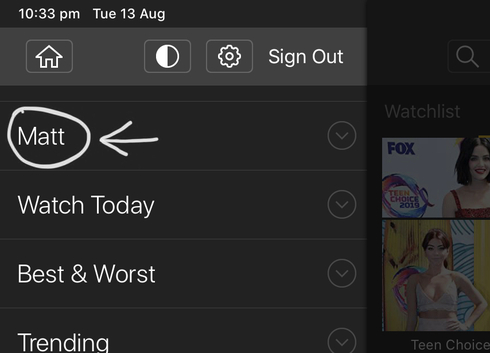
And I don't mean my user ID I've changed that already, I mean the real name that appears next to the arrow that leads you to e.g. 'your activity' on the website, or much more of your private stuff on the app.
I've checked the help centre's page related to the 'ID, real name etc' but it wasn't helpful at all, so I would very politely ask for a straight answer. :)
Thank you for your time!
bderoes
Champion
•
5.1K Messages
•
118.8K Points
7 years ago
The only name I'm aware of is the user name.
Unless you also have an IMDbPro account?
1
Taylor
Employee
•
2.3K Messages
•
40.7K Points
7 years ago
To update the name or email address registered on your IMDb account, please go to the Login and security page in your Account Settings.
Select the "Edit" button located to the right of the name on the account, then enter your desired name and select "Save changes".
1