




44 Messages
•
702 Points
Can't access my companies scorecard
about 2 weeks ago I applied for a scorecard for my company and got the following response.
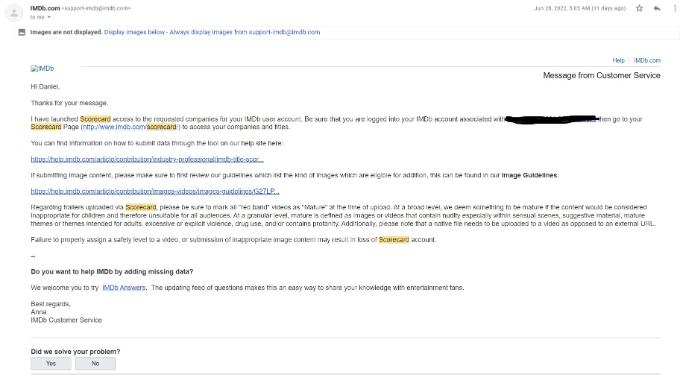
I have tried several times clicking the link it provides
http://www.imdb.com/scorecard/ however that link does not work. I have no other way to access the score card for my company. When I go to the help pge for this which is
https://help.imdb.com/article/contribution/industry-professional/imdb-title-scorecard/GR6ELNEMQZADBQ2B#, it gives me the same useless website I first stated. I was hoping someone can help me get the my companies scorecard. My company is DMart Productions [us], co0795342,
https://www.imdb.com/search/title/?companies=co0795342.
Hope to get some help on this soon as it is very frustrating.
Michelle
Employee
•
18.3K Messages
•
322.5K Points
4 years ago
Hi martdaniel1234 -
I can confirm that you do currently have Title Scorecard access for the company: DMart Productions.
Ensure that you are first logged into your registered IMDb account and then try accessing the Title Scorecard. If you encounter a problem, please try within a different browser, and/or try clearing your site cookies.
If you are still experiencing problems accessing your Title Scorecard after taking the above steps, confirm the exact steps you have take, post a screen shot of what displays when you try to access, and also confirm the operating system and browsers you have tried so our staff can investigate further.
Cheers!
1
0
Michelle
Employee
•
18.3K Messages
•
322.5K Points
4 years ago
Hi martdaniel1234 -
I'm glad to hear you are now able to access your Scorecard account. Concerning the new issue regarding uploading your videos, have you confirmed that your video file meets the following settings:
File Size: Up to 10 GB
Length: From trailers and clips to full length feature films
Quality: From standard to full HD 1080p
File Format: Most major formats such as WMV, AVI and Quicktime. IMDb does not support ProRes file formats. IMDb also accepts most major codecs but recommends H.264 for optimal results.
If the above video settings are met, I would then encourage you to check your browser to ensure it is up-to-date. You may also want to try uploading within a different browser (ie, Chrome, Firefox, etc.).
5
0
Giancarlo_Cairella
Employee
•
500 Messages
•
42.2K Points
4 years ago
Is this problem still occurring? If so, what browser/platform are you using? Can you upload the same file elsewhere (e.g. Dropbox or any other file transfer site) and send us the link to it so we can look at it and see if we can reproduce the problem?
2
0
martdaniel1234
44 Messages
•
702 Points
3 years ago
I would just like to say that I've appreciate the timeliness in which this issue is being handled. How the admins here are answering me in such a quick and efficent manner, so much so that the problem still persists without any solutions. Please, I would love some help with this issue that keeps persisting. I don't understand why you refuse to help me with this issue.
0
0
Giancarlo_Cairella
Employee
•
500 Messages
•
42.2K Points
3 years ago
Sorry for the delay, due to the fact I didn't see your response until now -- for future reference, adding new questions to an existing issue that already had a response is not the best way to surface a new problem. It's better to create a new thread specific to the new question/issue so the new comment isn't buried at the bottom of a long thread for a problem that has already been addressed.
As for the upload problem, unfortunately I don't have any suggestions. I downloaded the video file from Dropbox and uploaded it to the page for the short and it was processed without any problem, so whatever the issue is, it seems to be located at your end. It's not an issue with the video file itself, or with the upload feature (we haven't had any other reports of upload difficulties).
0
0
martdaniel1234
44 Messages
•
702 Points
3 years ago
So are you to tell me that every time I have a new issue, in order to respons I have to make an entirely new post? That seems absolutely absurd. If there were two seperate issues then that would make sense, but this is still the same issue. Yes I did have trouble logging into my scorecard initally but your associate @Michelle helped me with that and then I explained to her the new issue. If yall wanted me to make a new topic for it, yall should have told me when i first brought up my concern, but that didn't happen, did it? No. It did not. My concern was being haphazardly attended to here.
As for the issue I have, I have literally tried everything yall have told me as well as some of my own possible solutions: I've tried using a different browser, tried uploading it from a different location, tried using a different device, changed the file format. None of that works. How are you to tell me that this is all my fault that I cant upload my video when this is clearly an issue with the website? Just because you clearly dont know what to do doesn't mean there's someone else, someone who likely knows what they're doing, that can't help me. Don't you dare tell me something like "Your response should be more appropriate for us to help you" as this has been an ongoing issue and I've recieved very little help. I want someone who can properly help me throught this situation without the condescending tone in which you just responded to me with. I assume that it wont happen, i'll be surprised if you even see this message, but that's what should happen. Some should properly help me, take my concerns seriously, and see how this issue can be resolved without blaming me for the issue.
0
0
Giancarlo_Cairella
Employee
•
500 Messages
•
42.2K Points
3 years ago
I'm not sure how uploading a video for you or suggesting the best way to get an answer from a community forum qualifies as being condescending.
Re: the problem with video uploads, let me clarify my previous response: we are not aware of any issue with video uploads and we are unable to reproduce the problem even using the same video file you have been trying to upload. You are free to draw your own conclusions as to whether this points to a problem at our end or yours. It's not a matter of blame -- it's simply a statement of fact: we don't have a way to remotely diagnose a problem that affects only one user and is therefore almost certainly caused by something specific to that user's setup.
Since the issue originally reported in this thread has been resolved, I'm going to close this. For additional support, feel free to contact IMDbPro's customer service staff directly via the form located at http://www.imdb.com/contact
0
0